
Docker has become one of the most important technologies in modern software development. Whether you're building web applications, mobile backends, AI services, or enterprise software, Docker makes it easy to package applications and run them consistently across different environments.
Instead of worrying about "it works on my machine" problems, Docker allows developers to package an application with everything it needs—including libraries, dependencies, and runtime—inside a lightweight container.
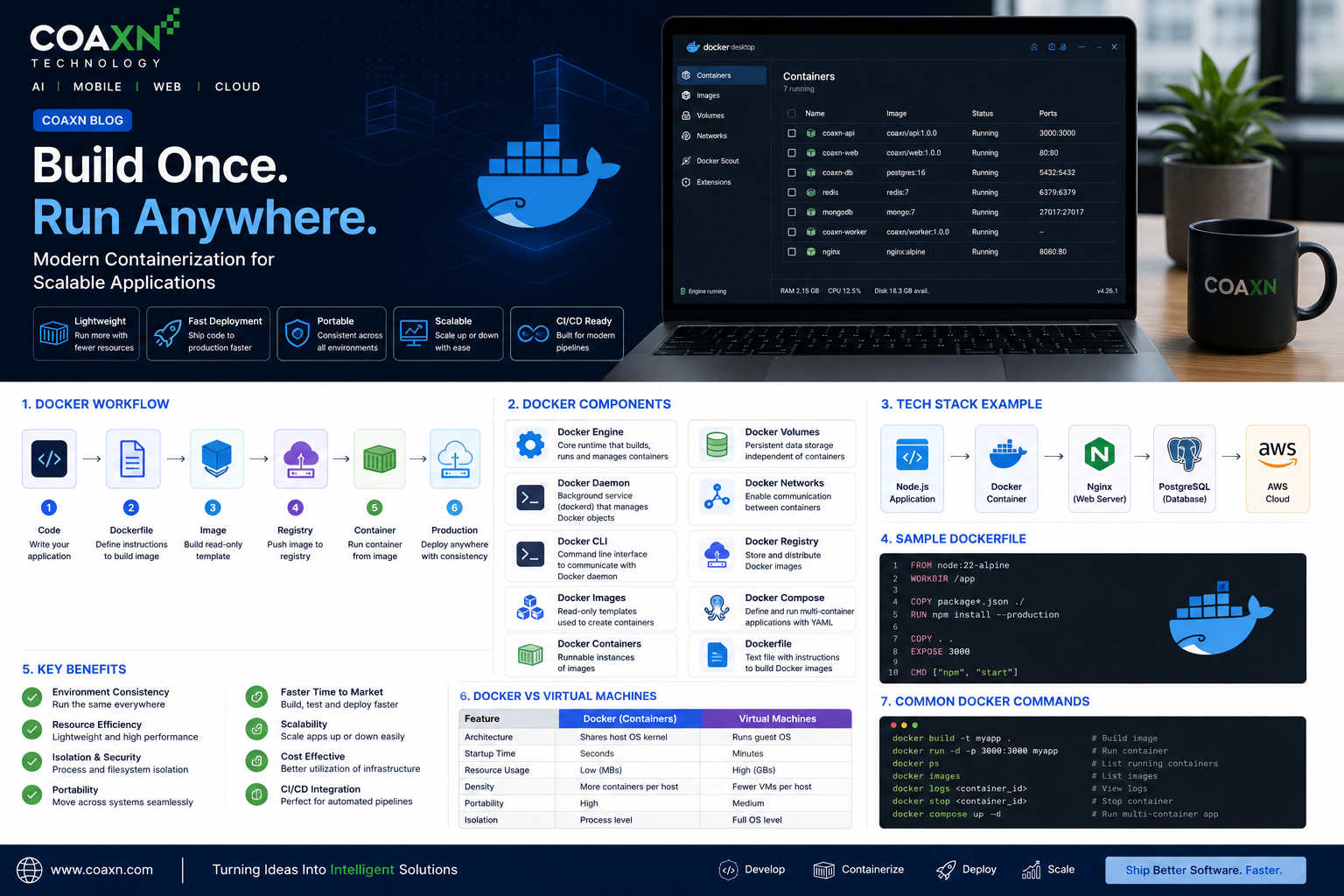
What is Docker?
Docker is an open-source containerization platform that enables developers to build, package, ship, and run applications in isolated environments called containers.
Containers are lightweight, portable, and much faster than traditional virtual machines because they share the host operating system kernel.
Docker Architecture
- Developer
- Docker CLI
- Docker Engine
- Docker Daemon
- Docker Images
- Docker Containers
- Docker Registry (Docker Hub / Private Registry)
- Host Operating System
Core Docker Components
1. Docker Engine
Docker Engine is the core runtime responsible for building, running, and managing containers.
It consists of:
- Docker Daemon (dockerd)
- REST API
- Docker CLI
2. Docker Daemon
The Docker Daemon runs in the background and manages Docker objects such as images, containers, networks, and volumes.
3. Docker CLI
The Docker Command Line Interface allows developers to interact with Docker.
Common commands include:
docker build
docker pull
docker run
docker ps
docker stop
docker logs
docker images
docker compose up
4. Docker Images
A Docker Image is a read-only template containing the application, operating system libraries, runtime, and dependencies.
Images are immutable and serve as blueprints for creating containers.
5. Docker Containers
A container is a running instance of an image.
Containers are isolated but lightweight, allowing multiple applications to run efficiently on the same server.
6. Dockerfile
A Dockerfile is a text file containing instructions to build Docker images automatically.
Example:
FROM node:22

WORKDIR /app

COPY . .

RUN npm install

EXPOSE 3000

CMD ["npm","start"]
7. Docker Registry
Docker images are stored inside registries.
Popular registries include:
- Docker Hub
- GitHub Container Registry
- Amazon ECR
- Google Artifact Registry
- Azure Container Registry
8. Docker Volumes
Volumes store persistent application data outside the container lifecycle.
Even if a container is deleted, the data remains safe.
9. Docker Networks
Docker networking allows containers to communicate securely.
Network types include:
- Bridge Network
- Host Network
- Overlay Network
- Macvlan Network
10. Docker Compose
Docker Compose manages multiple containers using a single YAML file.
Example:
version: "3"

services:

  frontend:
    build: ./frontend

  backend:
    build: ./backend

  database:
    image: postgres:16
Docker Workflow
- Write application code.
- Create a Dockerfile.
- Build Docker Image.
- Push image to Docker Registry.
- Pull image on server.
- Run Docker Container.
- Monitor logs and performance.
Why Businesses Use Docker
- Faster deployments
- Environment consistency
- Easy scaling
- Microservices architecture
- CI/CD automation
- Cloud-native applications
- Reduced infrastructure costs
- Improved developer productivity
Docker vs Virtual Machines
| Docker | Virtual Machine |
|---|---|
| Lightweight | Heavyweight |
| Starts in seconds | Takes minutes |
| Shares OS Kernel | Separate Guest OS |
| Lower resource usage | Higher memory consumption |
Best Practices
- Use official base images.
- Keep images lightweight.
- Use multi-stage builds.
- Never store secrets inside images.
- Scan images for vulnerabilities.
- Use Docker Compose for local development.
- Implement health checks.
- Automate deployments using CI/CD pipelines.
How CoAxn Technology Uses Docker
At CoAxn Technology, Docker plays a vital role in our software delivery process. We use Docker to containerize web applications, Flutter backends, Node.js APIs, Python AI services, OCR engines, and database services.
Combined with CI/CD pipelines, Docker enables faster deployments, easier scalability, and reliable production environments across cloud platforms.
Conclusion
Docker has transformed modern software deployment by making applications portable, scalable, and easier to manage. Understanding Docker's architecture and components is essential for developers building cloud-native applications, microservices, and enterprise solutions.
Whether you're a beginner or an experienced engineer, mastering Docker will significantly improve your development workflow and deployment strategy.