Introduction: Flutter Development Is Entering a New AI Era
Artificial intelligence is becoming an integral part of modern applications. From intelligent customer support and document processing to conversational assistants and automated business workflows, developers increasingly need to integrate language models into everyday software products.
For Flutter developers, however, building a reliable AI feature involves more than sending a prompt to a model and displaying the response. Production applications must handle authentication, structured outputs, backend integrations, tool execution, error handling, observability, security, and the possibility of switching between AI providers.
This is where Genkit Dart 1.0 becomes relevant.
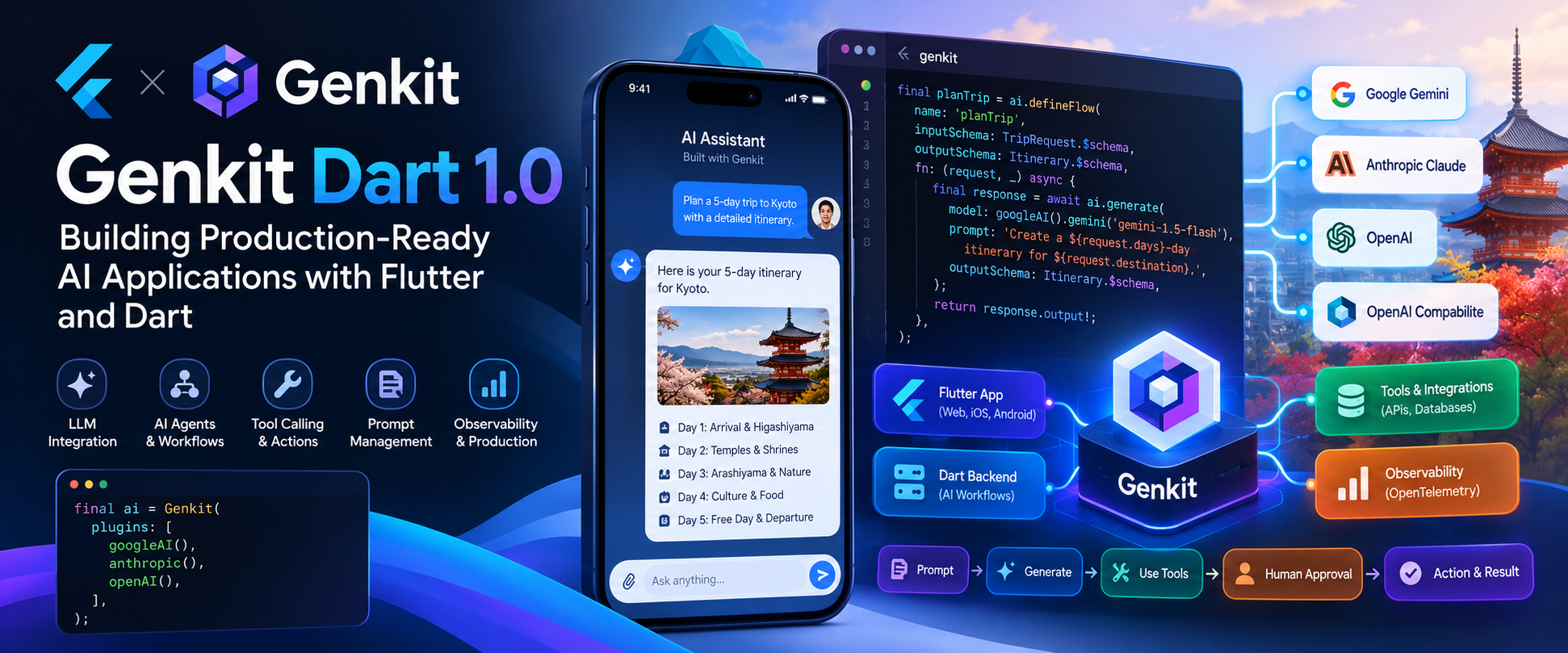
Announced by Google on October 8, 2026, Genkit Dart 1.0 is the first stable release of its open-source AI framework for building AI-powered features and agentic applications using Dart. It gives Flutter and Dart developers a structured approach to working with language models, creating AI workflows, connecting tools, and deploying AI functionality across client and server environments.
Rather than treating AI as an isolated API integration, Genkit provides building blocks for developing AI features as part of a complete application architecture.
1. What Is Genkit Dart?
Genkit is an open-source framework designed to help developers build AI-powered applications and agentic workflows. Its Dart implementation allows teams to use the same programming language across Flutter applications and Dart backend services.
It supports a development model in which AI functionality can be organized into reusable workflows, connected to external tools, tested locally, and deployed as part of a production system.
Genkit Dart provides capabilities including:
- Integration with multiple language-model providers.
- AI generation with structured input and output.
- Type-safe workflows using Dart schemas.
- Remote actions that connect Flutter clients to backend AI logic.
- Tool calling and human approval for sensitive actions.
- Prompt management through Dotprompt.
- Middleware for retries, logging, caching, and other cross-cutting behavior.
- A local Developer UI for experimenting with prompts and inspecting execution traces.
- Production telemetry through OpenTelemetry integrations.
These capabilities are particularly useful when AI features must interact with real application data rather than simply generate text.
2. Why Does Genkit Matter for Flutter Developers?
Flutter already allows developers to build Android, iOS, web, and desktop applications from a shared codebase. Dart can also run on the server, which creates an opportunity to share models, validation logic, and data structures across application layers.
Without a framework, an AI integration may require developers to independently implement model requests, prompt construction, response parsing, retries, tool execution, logging, and backend communication.
As the feature grows, this code can become difficult to maintain.
Genkit provides a more organized approach by separating AI workflows from the user interface and giving developers reusable abstractions for model interaction, structured data, and tool execution.
For example, a Flutter application could contain the user interface for an AI assistant, while a Dart backend handles model calls, retrieves authorized business data, and invokes external APIs.
This separation is especially important when the application processes confidential documents, customer records, financial information, or other sensitive business data.
3. Model Flexibility: Working With Different AI Providers
One of the useful characteristics of Genkit Dart is its model-provider abstraction.
The 1.0 announcement highlights support for Google Gemini, Anthropic Claude, OpenAI, and OpenAI-compatible models through provider plugins. This allows developers to work with different models through a consistent Genkit interface.
Consider an application that initially uses Gemini for summarization. The engineering team might later evaluate another provider for a particular workload because of response quality, latency, cost, or structured-output requirements.
With a provider abstraction, the application can isolate much of its business logic from provider-specific request handling.
Example: Initializing Genkit
import 'package:genkit/genkit.dart';
import 'package:genkit_google_genai/genkit_google_genai.dart';
import 'package:genkit_anthropic/genkit_anthropic.dart';

final ai = Genkit(
  plugins: [
    googleAI(),
    anthropic(),
  ],
);

Future<void> main() async {
  final response = await ai.generate(
    model: googleAI().gemini('gemini-flash-latest'),
    prompt: 'Explain how an AI assistant can help a sales team.',
  );

  print(response.text);
}
This example illustrates the basic structure: initialize Genkit with the required plugins and invoke a model through the framework.
Exact model identifiers and package APIs should always be checked against the versions installed in your project.
Does This Mean Every Model Is Interchangeable?
No. A common interface simplifies integration, but different models can still behave differently.
Teams should evaluate:
- Response quality for the actual task.
- Structured-output reliability.
- Tool-calling behavior.
- Latency and throughput.
- Token limits and pricing.
- Data handling and provider policies.
Model flexibility is valuable because it makes evaluation and experimentation easier, not because it eliminates the need for testing.
4. Type-Safe AI Workflows
Language models usually generate text, but business applications often require structured information.
A travel planner needs an itinerary. An invoice application needs extracted invoice fields. A customer-support application may need a category, priority, and recommended next action.
If the application expects JSON but receives incomplete or incorrectly formatted output, additional validation and error handling become necessary.
Genkit Dart supports schema-driven workflows that help define expected inputs and outputs. The framework uses Dart's type system and schema tooling to make AI workflows easier to validate, test, and integrate.
Example: An AI Travel Planning Workflow
Imagine building a Flutter application that accepts a destination and trip duration, then returns a structured itinerary.
final planTrip = ai.defineFlow(
  name: 'planTrip',
  inputSchema: TripRequest.$schema,
  outputSchema: Itinerary.$schema,
  fn: (request, _) async {
    final response = await ai.generate(
      model: googleAI().gemini('gemini-flash-latest'),
      prompt:
          'Create a ${request.days}-day itinerary '
          'for ${request.destination}.',
      outputSchema: Itinerary.$schema,
    );

    return response.output!;
  },
);
This is an illustrative example of the flow pattern; the application must define its request and itinerary schemas and validate the generated output appropriately.
The workflow establishes a contract between the request, AI generation step, and expected result.
That contract makes the AI capability easier to reuse in different parts of an application, test independently, and expose through a backend endpoint.
5. From Flutter UI to a Dart AI Backend
A major architectural decision is where the AI logic should execute.
For a quick prototype, a model request may run directly from a Flutter application. For production systems, sensitive prompts, private API credentials, business rules, and privileged integrations generally belong on a trusted backend.
Genkit supports both client-side experimentation and server-side execution, including remote actions that allow a Flutter client to invoke a Dart workflow.
Recommended Production Architecture
Flutter Application
        |
        v
User Authentication
        |
        v
Authenticated API Request
        |
        v
Dart / Genkit Backend
        |
        +---- Input Validation
        |
        +---- Authorization
        |
        +---- AI Model
        |
        +---- Business Tools
        |
        +---- Logging and Monitoring
        |
        v
Validated Response
        |
        v
Flutter UI
In this architecture, the mobile application focuses on presentation and user interaction. The backend controls access to sensitive operations and coordinates AI execution.
Connecting Through a Remote Action
Genkit supports defining remote actions with input and output schemas so a Flutter client can invoke a workflow exposed by a backend.
final planTrip = defineRemoteAction(
  url: 'https://api.example.com/planTrip',
  inputSchema: TripRequest.$schema,
  outputSchema: Itinerary.$schema,
);

final itinerary = await planTrip(
  input: TripRequest(
    destination: 'Kyoto',
    days: 5,
  ),
);
This pattern helps separate client-side presentation from server-side AI processing while maintaining a defined data contract.
In a real implementation, the endpoint must enforce authentication, authorization, request limits, validation, and appropriate error handling.
6. Building AI Agents Instead of Simple Chatbots
A conventional chatbot generally receives a message and returns a response. An AI agent can go further by selecting tools, gathering information, and coordinating multiple steps to complete a task.
For example, a business assistant might need to:
- Understand a user's request.
- Retrieve information from an authorized business system.
- Check the retrieved data.
- Decide whether another tool is required.
- Ask for approval before a sensitive operation.
- Execute the approved action.
- Summarize the outcome.
Genkit provides tool-calling and workflow primitives that help developers build these kinds of systems.
Real-World Example: An AI Business Assistant
Suppose a user asks:
Find my pending invoices and prepare a payment summary.
The assistant could call a tool that retrieves invoices belonging to the authenticated user or organization, calculate the relevant totals through trusted application logic, and ask a model to summarize the results.
The model should not receive unrestricted access to the entire database. The application must determine which records the user is allowed to access before returning information to the AI workflow.
This is the difference between adding a conversational interface and engineering a reliable AI feature.
7. Tool Calling With Human Approval
Some AI actions have real consequences. Booking a hotel, submitting an expense claim, modifying a customer record, or initiating a payment should not be treated like generating a paragraph of text.
Genkit Dart 1.0 includes human-in-the-loop interrupt capabilities for tool execution. A tool can pause a generation loop and return an interruption instead of completing the action immediately.
The application can then present the proposed action to the user and resume the workflow after confirmation.
Example Workflow
User Request
    |
    v
AI Determines Required Action
    |
    v
Tool Validates the Request
    |
    v
Approval Required?
    |
    +---- Yes ----> Pause Workflow
    |                   |
    |                   v
    |              User Reviews
    |                   |
    |                   v
    |              Confirmation
    |                   |
    +-------------------+
                        |
                        v
                 Execute Action
                        |
                        v
                 Return Result
For example, a hotel-booking tool can pause before making a reservation. The Flutter application displays the hotel, dates, and total price, then asks the user to confirm.
The approval requirement must be enforced by the tool and backend workflow, not merely by instructions in the model prompt. The server must also validate the resumed operation and its authorization context.
8. Middleware: Adding Reliability to AI Workflows
AI integrations often need behavior that applies across multiple model calls.
Examples include:
- Retrying transient failures.
- Logging execution details.
- Caching suitable responses.
- Applying model fallback policies.
- Enforcing tool-approval rules.
- Loading reusable skills or capabilities.
Genkit middleware provides extension points for such cross-cutting behavior.
For example, a production workflow might retry a temporary failure a limited number of times. A separate fallback strategy could use another model when the primary provider is unavailable, provided the alternative model satisfies the application's requirements.
Retries must be designed carefully. Repeating a read-only operation is different from repeating a payment or booking operation. Side-effecting operations need idempotency and duplicate-execution protection.
9. Prompt Management With Dotprompt
Prompts are application logic. They influence the model's instructions, expected behavior, output format, and interaction with tools.
When prompts are embedded throughout application code, changing them can become difficult. Teams may also struggle to determine which prompt version produced a particular response.
Genkit's Dotprompt capability allows prompt templates, model configuration, and input schemas to be maintained in dedicated files.
Example Prompt File
---
model: googleai/gemini-flash-latest
input:
  schema:
    destination: string
---

Write a friendly, two-sentence introduction
to {{destination}} for a first-time visitor.
The application can load the prompt by name and supply the input values at runtime.
final introPrompt = await ai.prompt('destinationIntro');

final response = await introPrompt({
  'destination': 'Kyoto',
});
This separation can improve maintainability, review, testing, and collaboration between developers and teams responsible for AI behavior.
For production systems, prompts should be version-controlled and evaluated against representative test cases before significant changes are deployed.
10. Testing and Debugging With the Genkit Developer UI
One of the challenges in AI development is that the final response does not always explain where a problem occurred.
An unexpected answer may be caused by the prompt, model behavior, tool selection, retrieved data, schema validation, or a backend integration.
Genkit includes a local Developer UI that helps developers test workflows, experiment with prompts, and inspect execution traces.
The CLI can launch the Developer UI alongside a Dart process. For example:
genkit start -- dart run bin/server.dartThis can make development more systematic by allowing engineers to inspect workflow execution instead of relying entirely on manual testing through the Flutter interface.
What Should Teams Test?
- Valid and invalid inputs.
- Missing or incomplete model output.
- Unexpected tool arguments.
- Provider timeouts and failures.
- Authorization failures.
- Prompt changes.
- Approval and interruption paths.
- Responses that exceed expected limits.
AI testing should cover not only whether a response looks correct, but also whether the complete workflow behaves safely under failure conditions.
11. Production Observability and Telemetry
AI features introduce operational questions that traditional application monitoring may not answer on its own.
Teams may need to understand how long model calls take, how many tokens are used, where failures occur, and which workflow steps contribute to latency.
The Genkit ecosystem includes a genkit_otel integration for exporting traces, token-usage information, and latency metrics using OpenTelemetry GenAI semantic conventions.
These signals can be connected to an appropriate observability backend.
Recommended AI Operational Metrics
- End-to-end request latency.
- Model-call latency.
- Workflow success and failure rates.
- Token usage and estimated cost.
- Tool execution failures.
- Retry frequency.
- Human-approval completion rates.
- Output validation failures.
Monitoring should also account for privacy. Prompts and model outputs can contain sensitive information, so teams should define what is recorded, who can access it, and how long it is retained.
12. A Practical Use Case: AI-Powered Document Processing
Consider a mobile application that allows employees to upload invoices, receipts, or other business documents.
A basic implementation might upload a file and ask a language model to extract its contents. A production implementation needs a more complete workflow.
Possible Architecture
Flutter App
    |
    v
Secure Document Upload
    |
    v
Backend Validation
    |
    v
Document Extraction
    |
    v
Genkit Workflow
    |
    +---- AI Model
    |
    +---- Schema Validation
    |
    +---- Business Rules
    |
    v
Review Screen
    |
    v
User Confirms Extracted Data
    |
    v
Save or Submit Record
Genkit can coordinate the AI generation and structured-output portions of this workflow. Document storage, file validation, OCR, database writes, and business-rule enforcement may require additional services or application code.
Example Extracted Fields
{
  "supplier": "Example Supplies Ltd",
  "invoiceNumber": "INV-2048",
  "currency": "USD",
  "total": 1250.00
}
This JSON is an illustrative example of the expected result, not a guarantee that a model will always extract every field correctly.
The application should validate totals, currency, required fields, and relevant business constraints. Financial records should not be committed solely because the model returned syntactically valid JSON.
13. Another Use Case: A Context-Aware Customer Support Assistant
Customer support is another practical application for Genkit.
Imagine a Flutter application in which customers can ask questions about orders, subscriptions, or product features.
A well-designed assistant could combine an LLM with controlled tools that retrieve authorized order details, search product documentation, and create support tickets.
Example Interaction
Customer: Where is my latest order?
The workflow would authenticate the customer, retrieve the appropriate order through a trusted backend, and pass only the necessary information into the AI response-generation step.
Assistant: Your order is currently being prepared. The latest available update was recorded this morning.
The response should be grounded in actual system data. If the backend cannot retrieve the order status, the assistant should report the limitation rather than inventing an update.
Genkit can help organize the workflow, while retrieval, authorization, data freshness, and business rules remain responsibilities of the application architecture.
14. Stateful Agents and Generative UI: What Comes Next?
The Genkit Dart 1.0 announcement also discusses higher-level capabilities that are being developed under an experimental API.
Two notable directions are stateful agents and generative UI.
Stateful Agents
A stateful agent can combine a model, system instructions, tools, and conversation state. Session storage can allow a conversation to continue across multiple turns and application restarts.
This is useful for assistants that handle longer tasks, such as preparing a report, planning a trip, or coordinating a multi-step business workflow.
Because these higher-level APIs are identified as experimental in the announcement, teams should evaluate their maturity and API stability before depending on them in critical production workflows.
Generative UI With A2UI
Most AI assistants return text. Generative UI introduces another possibility: an agent can produce a structured interface that the application renders as interactive components.
For example, instead of responding with a paragraph about a booking, an assistant could present a confirmation card containing dates, prices, and an approval action.
The announcement describes the Genkit A2UI integration as a way to stream UI surfaces such as forms, date pickers, and confirmation cards that Flutter can render using native widgets.
This approach could make AI interactions more practical by connecting conversational intent with familiar application controls. It also requires strict validation of generated UI descriptions and explicit authorization for any actions triggered by those components.
15. Security Considerations Before Going to Production
Using an AI framework does not automatically make an application secure. The application still needs a clear security architecture.
Protect API Credentials
Private model-provider API keys should not be embedded in a published Flutter application. Client binaries can be inspected, and embedded credentials may be extracted.
For most production applications, sensitive model calls should be routed through a trusted backend that stores credentials securely.
Enforce Authorization Outside the Model
A prompt that says "only access the current user's records" is not an access-control mechanism.
The backend must independently authenticate the caller, verify permissions, restrict the records that can be retrieved, and validate every sensitive action.
Control Tool Execution
Tools that send emails, modify records, issue refunds, create bookings, or initiate payments should implement server-side validation and explicit permission checks.
Human approval should be required for actions that need user consent. Sensitive operations should also be protected against duplicate execution and replay.
Plan for Model Failure
Models may produce incorrect, incomplete, or unexpected outputs. Validate structured responses, handle timeouts, limit request sizes, and provide a safe fallback when the workflow cannot complete.
16. Is Genkit Dart 1.0 the Right Choice for Your Project?
Genkit Dart is worth evaluating if your team builds Flutter applications and wants a structured way to integrate language models, AI workflows, tool calling, and backend services using Dart.
It may be particularly useful for:
- Conversational AI applications.
- AI-powered document processing.
- Customer-support assistants.
- Natural-language search and reporting.
- Workflow automation.
- Applications that use several model providers.
- AI features that require structured output and reusable workflows.
However, Genkit is not a replacement for every backend component. You may still need databases, authentication services, storage, queues, external APIs, observability infrastructure, and specialized processing systems.
Teams should also evaluate model quality, latency, cost, provider compatibility, deployment requirements, and the maturity of any experimental APIs against their specific use case.
17. Getting Started With Genkit Dart
Developers can begin by adding Genkit to a Dart or Flutter project:
dart pub add genkitFrom there, a practical learning path is:
- Set up the framework and the required model-provider plugin.
- Create a simple text-generation example.
- Define a workflow with structured inputs and outputs.
- Move sensitive model calls to a trusted backend.
- Connect a controlled business tool.
- Test failure cases using the Developer UI.
- Add logging, telemetry, authorization, and usage limits.
- Evaluate the complete workflow before production deployment.
Consult the official documentation and package versions before implementing the examples, as APIs and supported model identifiers can change.
Conclusion: A More Structured Way to Build AI With Flutter
Genkit Dart 1.0 is an important development for teams that want to build AI-powered applications using Dart across their frontend and backend.
Its combination of model-provider plugins, type-safe workflows, remote actions, tool calling, prompt management, middleware, local debugging, and production telemetry offers a structured foundation for moving beyond basic LLM integrations.
The biggest opportunity is not simply adding a chatbot to a Flutter application. It is building software in which AI can interpret requests, work with validated data, call authorized tools, coordinate multi-step processes, and communicate results through a familiar user interface.
Achieving that outcome still requires thoughtful architecture. Security, business rules, data validation, testing, monitoring, and human oversight remain essential, especially when AI can trigger real-world actions.
For Flutter and Dart teams exploring intelligent applications, Genkit Dart is a framework worth evaluating as part of the next generation of application development.
Official Resources
- Official announcement: Genkit Dart 1.0
- Genkit documentation and resources
- Genkit package on pub.dev
- Genkit engineering and release blog
At CoAxn, we explore practical approaches to AI engineering, Flutter development, and scalable application architecture to help businesses turn emerging technologies into useful software products.